
 Have a question? +971 56 404 0503




Cover Story
OPPO Reno15 5G Review: The Mid-Range Camera Phone You Should Actually Consider


Let me establish something upfront: I don’t get excited about smartphones anymore. After years of testing devices that promise innovation and deliver incremental updates, my expectations have been thoroughly calibrated to disappointment. “Revolutionary camera system” means slightly better night mode. “All-day battery” means you’ll need to charge by dinner. “Premium design” means it looks good in photos but feels cheap in hand.
The OPPO Reno15 5G didn’t really change this perspective. It’s a mid-range device in a crowded segment, launching without major fanfare, promising features we’ve heard before. On paper, it looks competent but not groundbreaking. However, it actually delivers what it promises, and that’s what matters.
The OPPO Reno15 5G isn’t trying to be everything to everyone. It’s laser-focused on one thing: being the best camera phone you can get in the mid-range segment. After a month of real-world testing, I can confidently say it succeeds, although with some minor compromises along the way.
Elegant & Well-Built

I tested the Aurora White variant, and I need to talk about this design because it’s genuinely special. OPPO calls it the “Dancing Aurora Design,” and in this case, the marketing hyperbole is justified. The back panel features precision-etched textures that recreate the northern lights phenomenon: glow patterns that shimmer and flow as light hits the surface from different angles. The finish also happens to be highly resistant to fingerprints and smudges, which is a practical bonus.

This one-piece sculpted glass design flows seamlessly without visible seams or gaps. Combined with the aerospace-grade aluminum frame and IP69 water resistance, this phone feels premium in hand, more so than its price suggests. At 7.8mm thin and 197g, it strikes an appreciable balance. It’s substantial enough to feel quality-built but not so heavy that extended one-handed use becomes uncomfortable.
ColorOS 16: Fast, Fluid & Polished, But Bloated
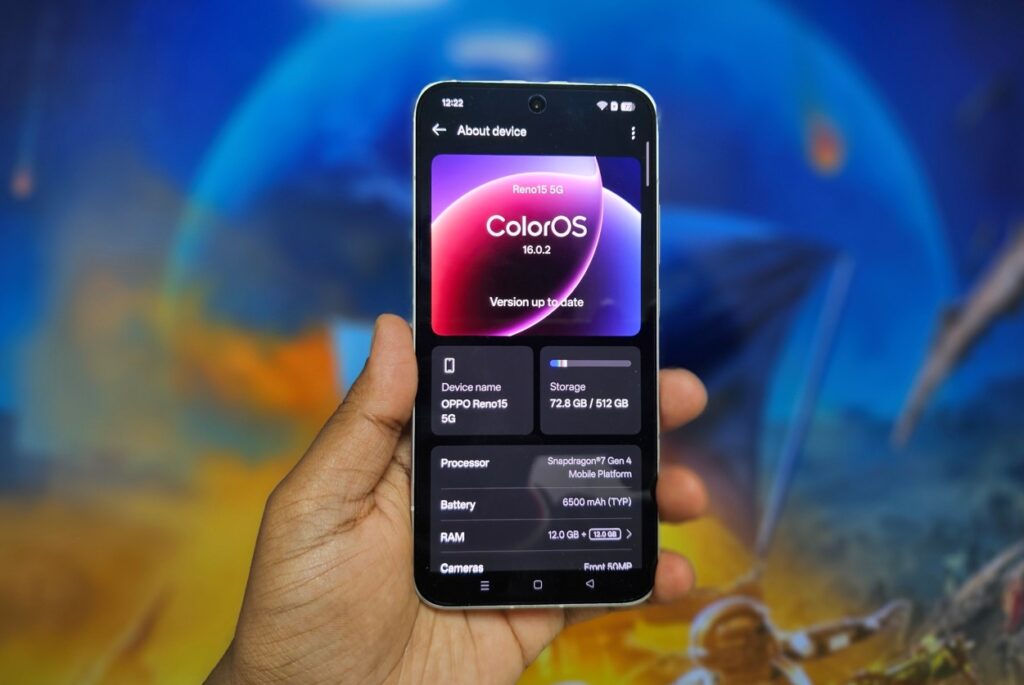
ColorOS 16 based on Android 16 is OPPO’s most refined software yet; but it still can’t escape the bloatware problem that plagues OPPO devices.The new update with upgraded internals, delivers noticeably fluid performance. Every interaction feels smooth, transitions are seamless, and the system maintains consistent responsiveness even under heavy multitasking.
I can run Spotify, Maps, WhatsApp, Chrome with 15 tabs, and camera apps simultaneously without stuttering or app reloads. The OS intelligently balances system resources. In practical terms, this means apps stay in memory longer, and switching between them is instantaneous.
AI Features That Actually Matter:
AI Recording with Transcription: Real-time transcription with speaker identification works surprisingly well. I’ve tested it in meetings: accuracy averages 80-85% with mixed accents, and speaker differentiation is consistent. Auto-generated titles are impressively accurate.

AI Clear Voice: Background noise reduction during calls genuinely works. Tested while walking near construction sites and busy roads; call quality remained clear with minimal background interference.
AI Writer: System-wide text generation for emails, captions, and drafts is convenient but not revolutionary. Quality is comparable to ChatGPT but having instant access without switching apps is genuinely useful.
The Bloatware Problem:
Out of the box, the Reno15 came loaded with unnecessary apps: OPPO’s duplicate app store, pre-loaded games, redundant utilities, and promotional content. Most can be uninstalled, but it requires 15 minutes of cleanup after first setup which is highly recommended.
Worse, some apps persistently send notifications promoting OPPO services and suggesting additional downloads. I had to manually disable notifications for multiple pre-installed apps. This is unacceptable at this price point as it makes the phone feel like it’s marketed at you rather than working for you.
Software Update Commitment:
OPPO promises 4 years of Android updates and 5 years of security updates. Launching with Android 16, that means guaranteed updates through Android 20 and security patches until 2030. For a mid-range device, this is exceptional.
The Triple Rear Camera System: Where Mid-Range Gets Serious
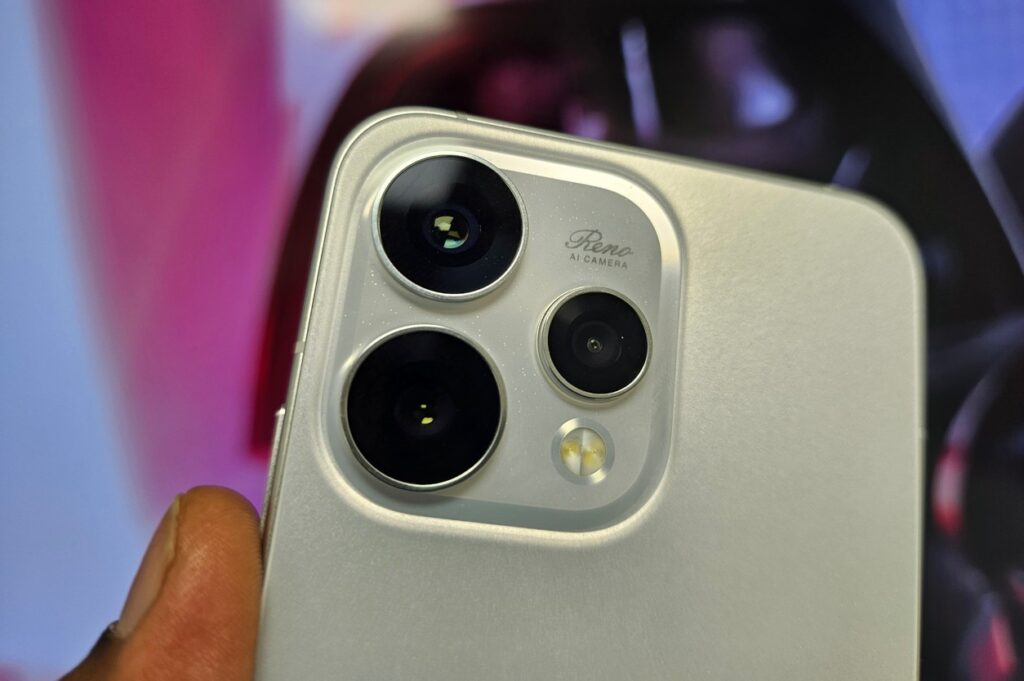
50MP Main Camera (f/1.8, OIS): The main camera is the consistent performer. I’ve shot extensively across Dubai’s extreme lighting conditions: harsh noon sun, deep shadows, golden hour, dim restaurants, and night markets. The camera handles it all with impressive competence.
The f/1.8 aperture and 2-axis OIS combination delivers sharp, well-exposed photos in most conditions. The OIS genuinely works. I can shoot one-handed while walking and still get sharp results about 80% of the time. Dynamic range is legitimately impressive for this price bracket. Backlit scenarios that would turn subjects into silhouettes on most mid-rangers produce balanced, usable photos on the Reno15.
50MP Telephoto (f/2.8, 3.5x optical zoom, OIS): This is the phone’s secret weapon. A 50MP telephoto with 3.5x optical zoom and OIS at this price point? That’s nearly unheard of. The classic 85mm-equivalent focal length is perfect for portraits – natural compression, flattering perspective, beautiful background separation.
I’ve shot dozens of portraits, and the results consistently rival phones costing significantly more. The bokeh looks organic, edge detection is accurate even around messy hair, and skin tones remain natural. The OIS means I can shoot handheld in less-than-ideal lighting and still get sharp results.
The zoom range is practical:
- 3.5x optical: Excellent quality
- 7x digital: Very good for social media
- 10x digital: Acceptable for documentation
- 20x+: Quality degrades rapidly
What genuinely surprised me: the telephoto actually works at night. Most phone telephotos become unusable after sunset. The Reno15’s telephoto with OIS captures usable low-light portraits. Some noise is visible, but shots remain sharp and detailed.
8MP Ultra-Wide: The Weaker Sibling: Here’s where compromises become obvious. The 8MP ultra-wide is adequate at best. Daytime shots are fine, good for landscapes, architecture, and group photos. Distortion is well-controlled, and colors match the main camera reasonably. But at night? Quality drops noticeably. Images come out soft, noisy, and lacking detail. Images are definitely usable, but not as impressive as the other two sensors.
The 50MP Front Camera: Best in Class, Full Stop
Let’s address the standout feature immediately: the 50MP front camera with autofocus is the same sensor used in the Reno15 Pro and Pro Max models. At this price point, having a flagship-grade selfie camera is unprecedented.
Why This Matters:
Most mid-range phones use 16MP or 32MP front cameras with fixed focus and mediocre quality. The Reno15’s 50MP sensor with autofocus captures genuinely detailed selfies that withstand cropping and editing. When you zoom into selfie photos, you can actually see texture, skin detail, and fine elements; they don’t just dissolve into mushy, over-processed blobs.
Autofocus on a Selfie Camera:
This sounds minor until you actually use it. The autofocus ensures sharp selfies whether you’re 30cm away or at arm’s length. It also enables macro-style close-ups. I’ve taken detailed selfies showing individual makeup details, fabric textures, and even eye reflections with perfect focus.
Group Selfies:
The field of view is wide enough to fit 6-7 people comfortably without awkward arm extensions. I tested this at multiple gatherings. the ultra-wide capability means everyone fits in frame without cutting off heads or forcing people to squeeze uncomfortably close.
Video Calls:
The 50MP sensor delivers exceptional video call quality. On Zoom, Google Meet, and WhatsApp video calls, multiple people commented on how sharp and clear my video looked compared to their feeds. For anyone doing frequent video calls or content creation, this front camera alone justifies consideration.
Stereo Speakers: Impressive, and Tunable

The Reno 15’s dual stereo speaker setup includes a unique “Ultra Volume Mode” that boosts output up to 300% beyond normal maximum volume. In theory, this sounds great for noisy environments. In practice, it’s a mixed bag.
Audio quality is very good. There’s decent bass presence, clear vocals, and controlled high-frequency response. The speakers deliver rich, full sound that’s genuinely enjoyable for media consumption and casual music listening. The stereo separation is good. Watching videos with the phone in landscape orientation provides a satisfying spatial audio experience. Gaming audio feels immersive with clear directional cues.
At 300% Volume in the Ultra Volume Mode, volume definitely increases; it’s genuinely loud enough to hear in very noisy environments. But audio quality deteriorates noticeably. I tested this extensively. For normal use, 70-90% regular volume is ideal. The 300% mode is only useful in specific scenarios; construction sites, extremely loud environments, or emergency situations where you need maximum audibility regardless of quality.
The Fingerprint Scanner: Actually Superfast
The optical in-display fingerprint scanner is genuinely one of the fastest I’ve tested. Recognition is near-instantaneous as there’s virtually no delay between touching the sensor and unlocking. It feels less like authentication and more like the phone simply recognizing you exist.
The registration process is quick and straightforward. The sensor area is well-positioned, easy to reach with your thumb in normal grip. Success rate is exceptionally high in my experience as I’ve tested with wet fingers, slightly oily fingers, and different screen protectors, and it consistently works on the first attempt.
Two-Day Battery Life: Liberation From Charging Anxiety
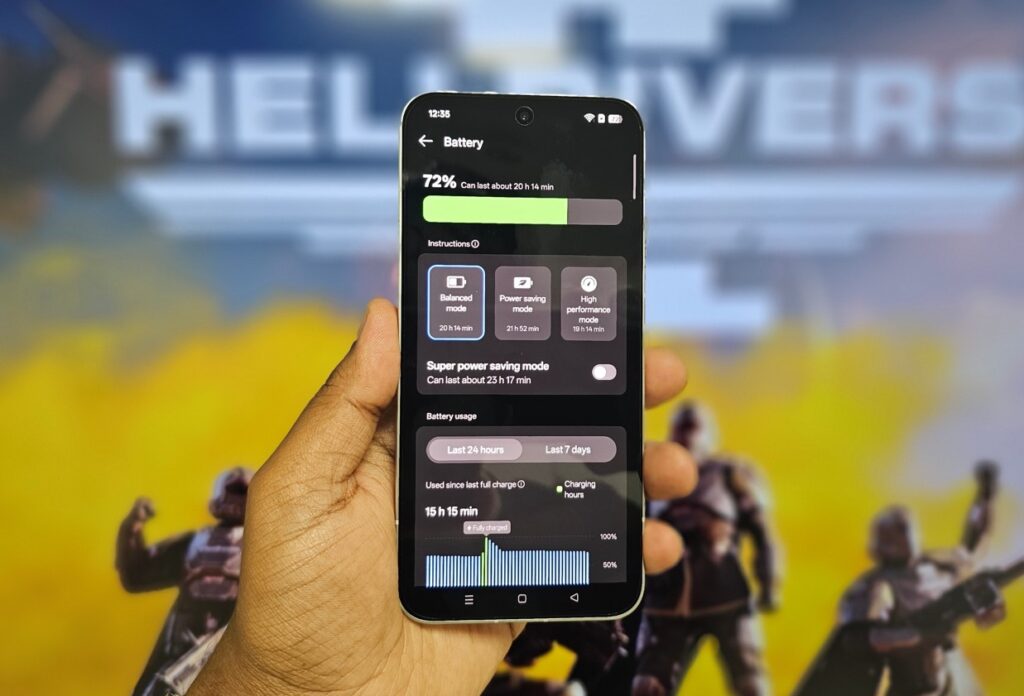
The 6500mAh battery delivers genuine two-day endurance for most users. My usage is heavy with extensive photography, social media, messaging, navigation, music streaming, video calls, and web browsing. Even with this load, I consistently finish full days with 35-40% remaining.
On lighter days (weekends with less photography and screen time), I’ve easily achieved two full days before needing to charge. I’ve forgotten to charge overnight multiple times. Woke up with 43%, proceeded with normal usage including photography, navigation, and media consumption, and still finished the day with 12%. That’s the kind of reliability that eliminates battery anxiety entirely.
When you do need to charge, 80W SUPERVOOC is impressively fast. 0-50% takes about 20 minutes. A full charge from near-empty takes approximately 50 minutes. And critically, OPPO includes the 80W charger in the box; a detail that shouldn’t be noteworthy but has become increasingly rare. The phone also supports battery health optimization. You can set a charging limit to extend long-term battery lifespan. The system can also learn your charging patterns and slow charging overnight to reduce battery stress.
Performance: Good Enough, Not Exceptional
The Snapdragon 7 Gen 4 delivers solid mid-range performance. This isn’t a flagship processor, and OPPO isn’t pretending it is. Apps launch quickly, multitasking is smooth, and daily tasks feel responsive. For typical usage (messaging, browsing, photography, social media, navigation, streaming music), it’s more than adequate. I’ve run Google Maps navigation with Spotify streaming in the background while messaging on WhatsApp and browsing Chrome with 12+ tabs open. Everything continued running smoothly without slowdown or app reloads.
Gaming Performance:

I tested PUBG Mobile and Call of Duty Mobile. At high settings, both run smoothly at 60fps. At maximum settings, frame rates occasionally dip but remain playable. Thermal management is good; the phone gets warm but never uncomfortably hot.
For casual and moderate gamers, performance is perfectly acceptable. You can enjoy popular titles at good visual quality with smooth performance. Competitive gamers demanding absolute maximum frame rates and minimum latency should look to flagship chips, but for everyone else, this processor is sufficient.
Who Should Buy the OPPO Reno15 5G?
Buy it if:
- Camera quality is your priority: This is arguably the best camera phone in the mid-range segment, full stop
- Selfies and video calls matter: The 50MP front camera with autofocus is unmatched at this price
- Portrait photography is important: The 50MP telephoto makes this phone a portrait powerhouse
- You want two-day battery life: 6500mAh delivers genuine endurance
- You value design: The Aurora White finish is genuinely beautiful
Skip it if:
- You need flagship gaming performance: Mid-range chip means mid-range gaming
- Stock Android is essential: ColorOS is feature-rich but heavily customized
The Verdict: Best Mid-Range Camera Phone
The OPPO Reno15 5G is the mid-range camera phone to beat right now. The combination of 50MP main camera, 50MP telephoto, and especially the 50MP front camera creates a photography experience that rivals devices costing significantly more. Add genuine two-day battery life, beautiful design, and fast charging, and you have a compelling package.
The front camera alone makes this phone worth considering for anyone who prioritizes selfies and video calls. Having the same 50MP sensor as the Pro models at mid-range pricing is unprecedented value.But OPPO undermines this with bloatware, persistent promotional notifications, and a weak ultra-wide camera. ColorOS 16 is polished and feature-rich, but the out-of-box experience feels cluttered and commercial rather than premium.
If camera quality (especially selfies and portraits) is your priority, the Reno15 5G delivers exceptional value. Just be prepared to spend 15 minutes cleaning up bloatware and disabling promotional notifications after first setup.
For content creators, selfie enthusiasts, portrait photographers, and anyone who values two-day battery life in a beautifully designed package, this is the mid-range phone to get.
Rating: 8/10
Camera: 9/10 – Exceptional main and telephoto, best-in-class selfie camera, weak ultra-wide
ColorOS 16: 7/10 – Polished and feature-rich, undermined by bloatware
Battery: 9.5/10 – Genuine two-day endurance
Performance: 7.5/10 – Good for daily use, not a dedicated gaming powerhouse
Design: 9/10 – Aurora White color option is genuinely beautiful
Value: 9/10 – Best camera-to-price ratio in mid-range segment
This is the mid-range camera phone I’d actually recommend—just disable the bloatware first.













What could follow the December deadline is an assessment cycle, not a filing cycle.
By Manish Bansal, Associate Partner, Dhruva Advisors, A Ryan Affiliate, Saudi Arabia
For most of the past five years, inter-alia, one of the major topics of tax conversation in Saudi boardrooms has been e-invoicing. Are we on the Fatoora platform? Which wave are we in? Has the ERP been configured or do we go with a third-party e-invoicing solution? Will we make the deadline?
Those were the right questions for the period we have just left. They are not necessarily the right questions for the period we are entering.

On 29 June 2026, the Zakat, Tax and Customs Authority (“ZATCA”), acting on a decision of the Minister of Finance, extended the Cancellation of Fines and Exemption of Financial Penalties initiative for a further six months, running from 1 July to 31 December 2026. It covers excise tax, value added tax, real estate transaction tax, withholding tax and corporate income tax. That much has been widely reported.
Less widely noticed is a condition set out in the accompanying guideline. If the Authority extends the initiative again past December, that further extension will not reach returns that fell due after 30 June 2026.
The Authority has not simply granted more time. It has informed the market, in advance, where the relief eventually stops. Whatever is announced in December, the clean-up window for historical positions is being drawn shut. For a tax administration, that is about as clear a statement as one can give.
What the regulator already sees
The reason this matters now, rather than in some indeterminate future, is that the Authority’s information position has changed fundamentally.
Wave 24 of the e-invoicing Integration Phase closed on 30 June 2026. Announced in September 2025, it captured every taxpayer whose VAT-subject revenues exceeded SAR 375,000 in 2022, 2023 or 2024. That figure is not arbitrary: it is the mandatory VAT registration threshold. In effect, the wave brought the entire registered population into scope.
And the direction has not stopped there. On 24 July 2026 – ZATCA published the criteria for Wave 25, halving the threshold to SAR 187,500 of VAT-subject revenue in 2022, 2023, 2024 or 2025, with integration required by 1 February 2027.
Under the Integration Phase, standard business-to-business invoices are cleared by ZATCA before they reach the buyer, and simplified business-to-consumer invoices are reported within twenty-four hours. Invoices must be issued in a prescribed structured format, carrying a cryptographic stamp and a unique identifier.
The Authority is therefore no longer reliant on what appears in a filed return. It holds the underlying transactional record, in structured form, close to real time, across the whole economy.
This is the shift most finance functions have not yet absorbed. For years, the Saudi assessment process began with an information request. In an environment of structured, near-live data, it begins instead with an anomaly the system has already identified. The taxpayer’s first substantive contact with the process is not a request for documents. It is a proposition to be answered.
Key exposure areas to be mindful of
In our experience, the following key areas could be more visible and exposed to assessment risk in the Kingdom once transactional data can be cross matched against declarations.
The first is permanent establishment risk arising from project delivery. Groups routinely deploy technical staff, secondees and subcontracted specialists into Saudi projects while treating the arrangement as an offshore supply. Given that most KSA government portals are inter-linked, careful monitoring of in-Kingdom presence is critical, in particular, employees of non-resident companies undertaking fly-in/fly-out assignments in the Kingdom. It is worth noting that the current tax law has no de minimis threshold for the creation of a permanent establishment. Accordingly, even a single day of presence in the Kingdom could potentially give rise to a permanent establishment, although in practice, the ZATCA may apply a more facts-based approach when assessing whether a permanent establishment exists.
Second is related-party pricing, and here a change that took effect two years ago is still under-appreciated. Following amendments to the Transfer Pricing By-Laws, the transfer pricing provisions apply to zakat payers as well as taxpayers for financial years beginning on or after 1 January 2024, and Advance Pricing Agreements became available to both. For a Saudi family group with decades of intercompany arrangements built for operational convenience rather than for documentation, this is a material change in obligation, and one that many such groups have not yet worked through.
Lastly, needless to state that VAT audits are likely to get much more sophisticated with real time data and the data analytics and AI tools available.
What the amnesty covers, and what it does not
Many companies are counting on this window. It is worth being precise about what it covers.
The initiative covers late registration, late payment and late filing fines, penalties on the amendment or correction of a VAT return, and other financial fines imposed under Article 45 of the VAT Law, including field detection and e-invoicing violations. To benefit, a taxpayer must register where registration is required, submit the outstanding returns, and either pay the amounts due or obtain ZATCA’s approval for an instalment plan.
Two limits deserve emphasis. The initiative does not extend to penalties relating to tax evasion violations. And it operates on fines for returns falling due up to 30 June 2026.
There is also a point that no guideline states because it does not need to. The initiative waives penalties. It does not validate a technical position. A voluntary disclosure that corrects an arithmetic omission is a straightforward matter. A voluntary disclosure that reveals a contestable tax treatment is a different exercise entirely, because it puts a position on the record that will be read. The analysis must come before the filing, not after it.
Fewer than four months
For most groups, what remains to be done before 31 December is a short list. It is also, notably, not a systems exercise. The e-invoicing platforms are already built and connected. The work now is reviewing the positions those systems have been reporting all along.
Reconcile first. Take VAT/ Tax/ Zakat returns, customs declarations, withholding tax filings and audited financial statements for the open years and reconcile them against one another before ZATCA’s systems do it. Where the numbers do not tie, understand why, and document the reason contemporaneously rather than reconstructing it under assessment.
Then sort. Separate the genuine errors, which the current window is designed to resolve, from the judgement positions, which need to be assessed on their merits and defended with evidence that pre-dates the query.
Finally, treat documentation as a deliverable with a deadline. Substantiation assembled after an assessment notice arrives carries markedly less weight than substantiation prepared when the transaction occurred.
A regulator that publishes wave criteria six months ahead, that notifies taxpayers directly, that issues guidance with worked examples, and that tells the market in advance where relief will end, is behaving like the administration of a mature investment destination. That predictability is an asset for serious businesses, and it is what long-term capital looks for.
But predictability runs in both directions. The Kingdom has been clear about what it expects and when. The businesses that will move through the coming assessment cycle with least disruption are those that use the next few months to answer the questions before they are asked.
Disclaimer: This article is intended for general information only and does not constitute tax, legal, accounting or other professional advice. It reflects the tax rules in force as of the publication date, and the described regulatory landscape continues to develop. Readers should obtain professional advice appropriate to their own facts and circumstances before acting on any matter discussed.
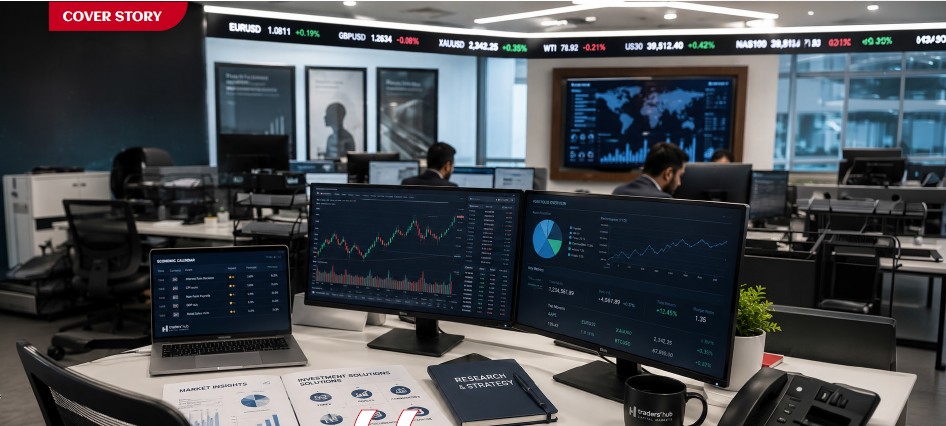
Traders’ Hub’s Michael Barbour on investor trust, technology, and the future of finance in the Gulf.
BY SRIJITH KN FOR FINANCIAL INTEGRATOR
Over the past few years, investor participation across the region has evolved beyond speculative trading activity into something far more structured, technology-driven, and institutionally aligned. Retail traders are becoming increasingly sophisticated, expectations around transparency and execution quality are rising, and financial platforms are under pressure to offer far more than simple market access.
The speculative frenzy that once defined large parts of retail trading is gradually giving way to a more measured investor mindset, shaped largely by regulation, financial awareness, and long-term wealth preservation rather than short-term market excitement.
In this changing landscape, brokerage firms are no longer positioning themselves purely as trading providers. Instead, many are beginning to evolve into broader financial ecosystems, combining infrastructure, education, technology, regulatory credibility, and long-term investment access into a single platform experience.
For UAE-based firms such as Traders’ Hub Capital Markets, this shift represents more than market expansion. It signals a transformation in how the region’s next generation of investors may engage with financial markets altogether.
Founded in 2022 and headquartered in Abu Dhabi, Traders’ Hub has rapidly positioned itself as a locally regulated, technology-enabled brokerage focused on transparency, multi-asset access, and client-centric trading infrastructure.
Today, the company offers access to more than 2,000 instruments across forex, commodities, equities, indices, and cryptocurrencies, while simultaneously preparing for a broader move into wealth management and long-term investment services.
But the story surrounding Traders’ Hub is not simply about growth.
It is also about the wider evolution of the UAE’s financial ecosystem itself.
THE SHIFT IN UAE INVESTOR CULTURE
Across the GCC, financial participation is changing shape.
The rapid rise of digital platforms, increasing financial literacy, regulatory modernization, and mobile-first investing have fundamentally altered how younger investors interact with markets.
In parallel, the UAE has continued strengthening its position as a regional financial hub, attracting capital, fintech innovation, institutional activity, and globally mobile investors seeking regulated access to international markets. This transformation has also created new expectations.
Today’s investors are increasingly prioritising transparency, regulatory protection, execution quality, multi-asset accessibility, and seamless digital experiences.
In many ways, expectations around trading platforms are beginning to resemble expectations traditionally associated with banking and wealth management institutions.
According to Michael Barbour, Head of Product Implementation at Traders’ Hub Capital Markets, these changes reflect a deeper transformation in investor behaviour itself.
“Investors increasingly seek integrated, trustworthy financial ecosystems prioritising long-term value, convenience, and institutional-grade service.”
Over the past five years, the psychological profile of the UAE investor has gradually shifted from short-term speculation toward a far more informed, disciplined, and globally aware mindset. Earlier retail participation was often driven primarily by leverage, speed, and short-term market movements. Today, however, younger investors across the UAE are becoming more research-driven, risk-conscious, and focused on long-term wealth creation rather than impulsive trading behaviour.

Modern traders are also seeking far more than market access alone. Transparency, educational support, analytical tools, platform stability, and institutional credibility are becoming increasingly important components of the investor experience itself.
FROM SCOTLAND TO GULF CAPITAL MARKETS
Long before helping shape the growth trajectory of Traders’ Hub Capital Markets, Michael Barbour’s early ambitions were far removed from financial markets.
Growing up in Stonehaven, a small Scottish town south of Aberdeen, he originally aspired to become a professional footballer, eventually playing semi-professionally before moving into finance.
His early exposure to financial systems came during the 2008 financial crisis while working within the legal and asset management sector in Scotland, assisting major UK banking institutions in managing distressed real estate portfolios during one of the most volatile periods in modern financial history.
That experience, combined with his later move to the Middle East in 2011 and subsequent years at the Dubai Gold and Commodities Exchange (DGCX), helped shape a perspective grounded not only in trading infrastructure, but in how markets behave under pressure, uncertainty, and rapid transformation.
Today, that institutional perspective continues influencing Traders’ Hub’s broader focus on operational credibility, technology infrastructure, and long-term investor engagement across the UAE market.
BUILDING A LOCALLY ROOTED TRADING PLATFORM
One of Traders’ Hub’s strongest positioning advantages lies in its status as a UAE-regulated Category 1 Capital Markets Authority (CMA) licensed broker, one of the highest licensing classifications within the country’s financial ecosystem.
In a market where offshore platforms have historically dominated retail participation, regulatory credibility has become increasingly significant, particularly as investors grow more conscious of operational risk, fund protection, execution transparency, and long-term platform reliability.
Rather than positioning itself through aggressive speculative messaging, Traders’ Hub appears to be building its identity around institutional-grade infrastructure, operational discipline, and client alignment.
Its trading environment is built around a Straight Through Processing (STP) execution model, meaning trades are routed directly to liquidity providers rather than internally warehoused by the broker itself.
In increasingly crowded financial markets, brokerage differentiation is no longer being shaped purely by leverage offerings or execution speed. Investors across the UAE are becoming far more conscious of pricing transparency, liquidity structures, operational credibility, and how trades are ultimately executed, particularly as financial literacy continues maturing across the region.
According to Michael Barbour, many investors still misunderstand how brokerage models differ operationally, particularly around spreads, slippage, pricing structures, and conflicts of interest between market-making and STP environments.
For Barbour, transparency itself is becoming a defining factor in long-term investor confidence.
Modern investors are also becoming more selective around how brokers disclose execution policies, fee structures, liquidity relationships, and client fund protections. In many ways, execution architecture itself is increasingly becoming part of the trust equation.
For regulated regional firms such as Traders’ Hub, this shift may ultimately represent a broader advantage. As investor sophistication continues evolving across the UAE, operational credibility and institutional transparency are beginning to matter as much as platform functionality itself.
FROM BROKERAGE TO FINANCIAL ECOSYSTEM
The transition from Traders’ Hub Currency Brokerage to Traders’ Hub Capital Markets reflects more than a naming evolution. It signals a broader ambition to position the company as a longer-term financial institution within the UAE’s evolving investment ecosystem.
Globally, the distinction between trading platforms, investment platforms, and wealth management ecosystems is beginning to blur. Increasingly, investors no longer want fragmented financial experiences spread across multiple platforms. Instead, they are seeking connected environments capable of combining active trading, long-term investing, financial planning, analytics, and educational support within a single ecosystem.
For Traders’ Hub, this transition also reflects an effort to solve a longstanding regional friction point: the difficulty many UAE investors face when moving between active trading and structured long-term wealth accumulation.
“The modern investor no longer wants isolated trading access. They want a complete financial environment,” says Barbour.
The company’s planned expansion into wealth management and broader investment services reflects a wider regional shift toward more integrated financial participation models.
TECHNOLOGY, AI, AND THE NEXT INVESTOR EXPERIENCE
As trading platforms become increasingly automated and algorithmically assisted, the financial industry is also confronting a deeper question: how much of investing should remain human?
Technology is rapidly becoming the defining layer of modern financial platforms, from AI-assisted analytics and mobile-first investing experiences to increasingly sophisticated execution infrastructure.
But while automation can enhance speed and efficiency, long-term investing still remains deeply shaped by human behaviour itself. Markets continue being influenced by fear, overconfidence, emotional reaction, and risk perception, factors technology alone cannot fully eliminate.
One potential differentiator for firms such as Traders’ Hub may therefore lie in how effectively they balance algorithmic intelligence with human judgement.
EDUCATION, TRUST, AND LONG-TERM ENGAGEMENT
As trading participation expands across the GCC, financial platforms are increasingly carrying responsibilities extending far beyond market access alone.
While digital platforms have lowered barriers into global financial markets, they have also intensified conversations around behavioural investing, financial literacy, emotional discipline, and long-term risk awareness.
Increasingly, sustainable platform growth may depend not only on user acquisition, but on trust, transparency, and investor education itself.
In the GCC particularly, where retail participation continues expanding rapidly, financial firms are beginning to recognise their role in shaping long-term investor behaviour and financial understanding.
THE NEXT PHASE OF REGIONAL FINANCE
The UAE’s financial landscape is evolving rapidly.
As regulation strengthens, investor sophistication increases, and technology continues reshaping how capital moves through markets, financial platforms and capital markets institutions are being forced to rethink what they represent within the broader financial ecosystem.
The company’s broader direction, spanning infrastructure investment, wealth management expansion, AI integration, mobile accessibility, and educational initiatives, reflects a wider regional transition toward more mature, technology-enabled financial participation.
Barbour believes the future of finance will increasingly belong to intelligent platforms capable of combining technology, trust, education, accessibility, and long-term wealth creation into a unified experience.
Whether this next generation of financial platforms ultimately succeeds will depend not only on execution speed or product breadth, but on something far more enduring: trust.
And in an increasingly crowded financial landscape, trust may ultimately become the most valuable asset of all.
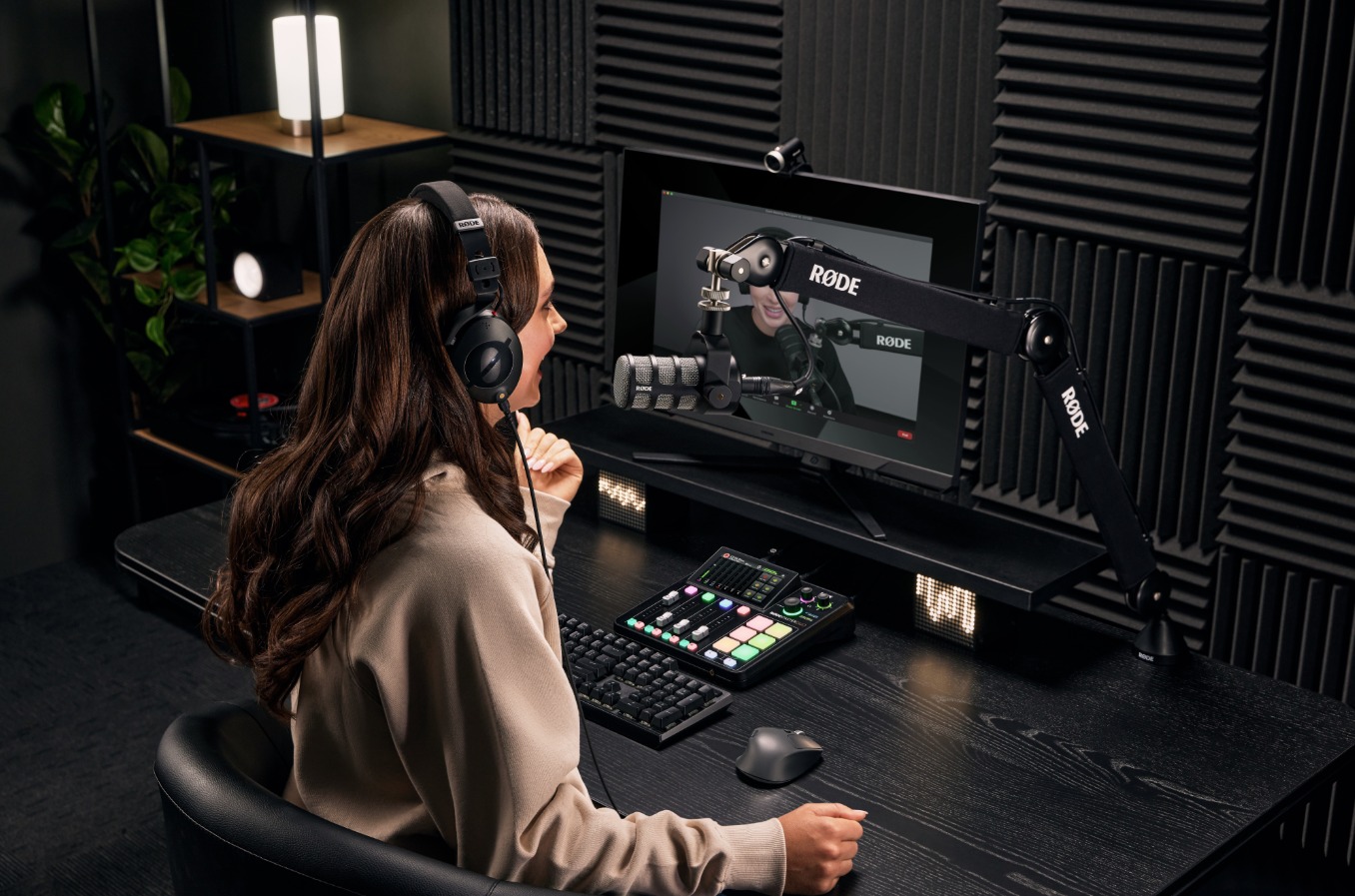

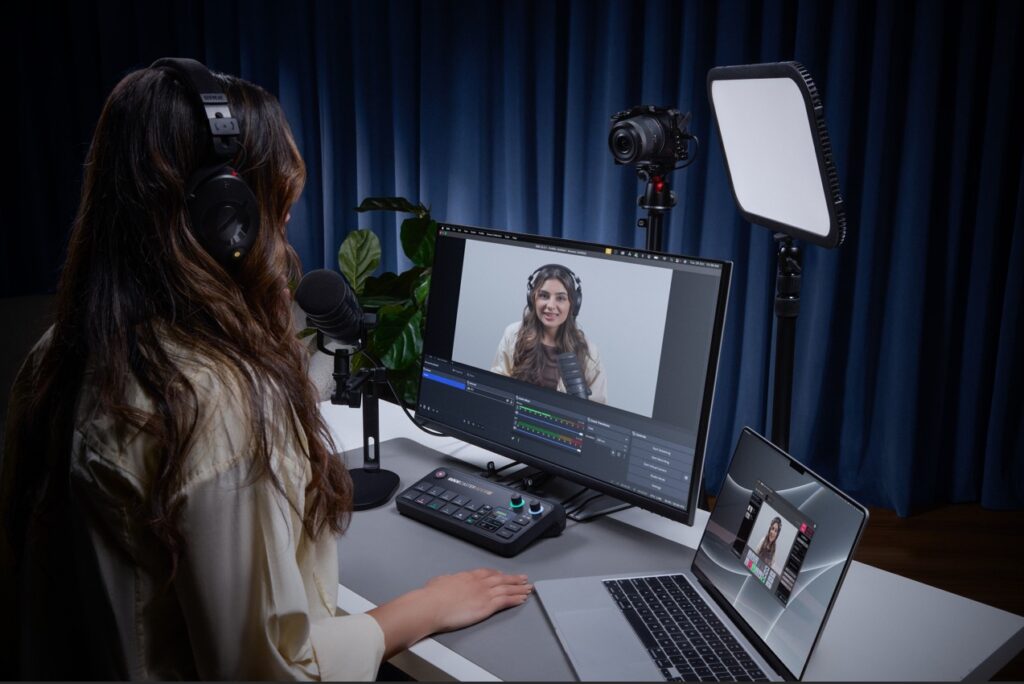
Walk into any modern content setup today, whether it’s a podcast studio, a corporate webinar room, or a hybrid event environment, and you’ll see a familiar pattern, one that reflects how fragmented the content production stack has become.
A microphone connected to an interface.
An interface connected to a laptop.
A laptop running multiple layers of software to mix, switch, stream, and record.
It works, but it’s rarely seamless.
Because the biggest challenge in content creation today isn’t access to tools, it’s understanding how they all fit together.
The Real Problem: Too Many Tools, Too Little Clarity
The rise of podcasting and video content has created a new kind of friction. Users are no longer asking what they can create; they are asking how to make the tools work together.
Recording audio separately, syncing video later, transferring large files to high-end machines, and relying on multiple software layers have become the default workflow. It works, but it is inefficient, expensive, and prone to failure.
The expanding ecosystem of devices, features, and formats has made even basic setup decisions unnecessarily complex.
When it comes to products from RØDE, users & creators already recognize the product’s potential to simply clarify and help elevate the overall workflow experience.
From Tools to Unified Systems
This is where the shift begins to stand out.
What we are seeing is not simply the addition of new features, but the consolidation of functions.
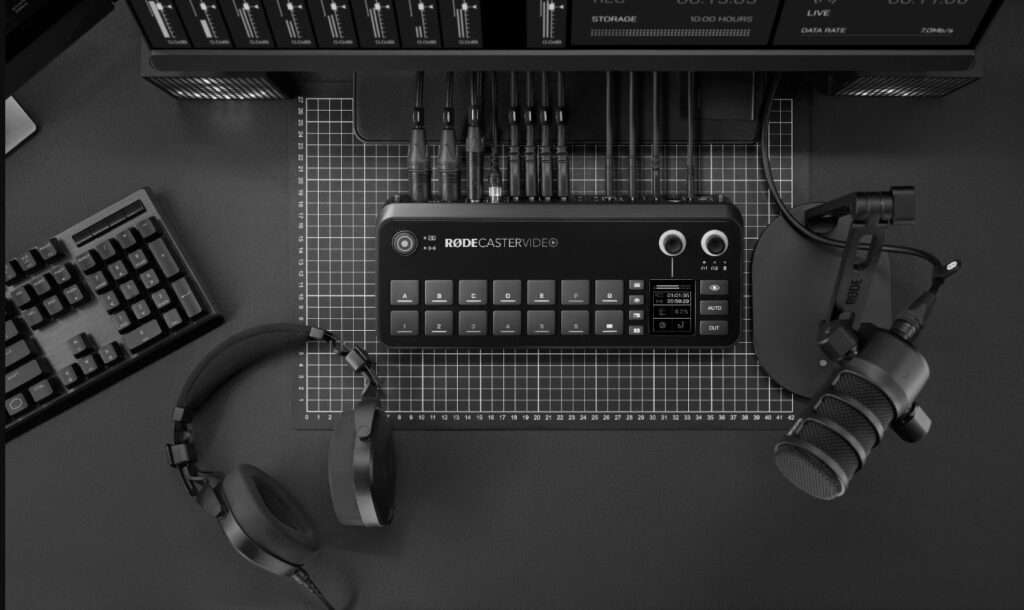
Mixer. Recorder. Audio interface. Video switcher. Stream encoder.
What traditionally required a stack of hardware and software is now being brought into a single console environment.
For creators, that simplifies production.
For enterprises, it changes how content infrastructure is designed.
As this shift gains momentum, it is also being acknowledged at a leadership level.

“Real innovation isn’t about adding more; it’s about removing friction and enhancing workflows.
Kalinda Atkinson,
With the introduction of platforms like the RØDECaster Video, we’re starting to see audio and video unified in one system, unlocking faster, more focused creative output.”
Global Marketing Director, RØDE
Why This Matters Beyond Creators
This shift is not limited to podcasters or streamers. Enterprises are increasingly building in-house content studios, executive communication channels, internal video platforms, and hybrid event capabilities as part of their broader communication strategy.
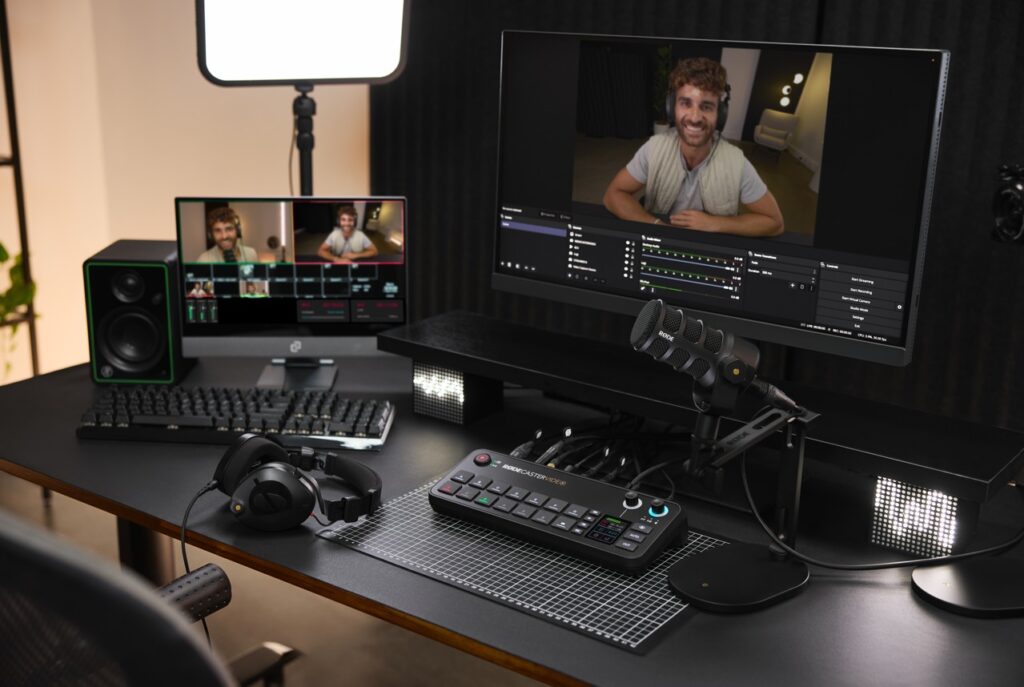
In these environments, complexity quickly becomes a bottleneck. Multiple tools often translate into longer setup times, increased points of failure, and a growing dependency on technical operators to manage what should ideally be straightforward workflows.
A unified system begins to reduce that friction, allowing teams to focus less on managing the process and more on the output itself.
The End of the Laptop-Centric Setup
One of the most significant changes is subtle: the laptop is no longer central.
With recording, streaming, and switching built directly into the console, content can now be produced without relying on external software or intermediary platforms. Audio and video routing happens natively within the system, removing the need to manage multiple layers of tools.
This, in turn, reduces reliance on tools like OBS Studio and lowers the need for high-performance machines in the production chain.
Broadcast Capabilities, Simplified
Features that were once limited to broadcast environments are now being integrated directly into compact systems. Capabilities such as multi-camera switching, ISO recording with separate tracks for each input, audio-based automatic switching between speakers, and network-driven video workflows like NDI are no longer confined to high-end production setups.
For enterprise teams, this translates into professional-grade production without the need for dedicated control rooms or complex broadcast infrastructure.
Modularity Signals Long-Term Thinking
Another important shift lies in how these systems evolve over time.
With expansion options such as adding video capabilities to existing audio consoles, RØDE is enabling a more modular approach to production. Instead of replacing entire systems, users can extend them based on their needs.
This becomes particularly relevant for organizations that may begin with audio-first content using consoles such as the RØDECaster Duo or RØDECaster Pro II, gradually expanding into video production with consoles such as RØDECaster Video, RØDECaster Video S, or even the RØDECaster Core, and scaling internal media capabilities over time. The result is a more flexible investment model that reduces upfront costs while supporting long-term growth.
A Shift in the Competitive Landscape
On the surface, this still appears to sit within the audio hardware category. In practice, however, it competes with something far broader.
As these systems begin to handle capture, processing, and output within a single environment, they start to overlap with production software ecosystems, video switching platforms, and content workflow tools.
The implication is clear: when orchestration happens within the system itself, the need for external layers begins to diminish.
The Opportunity Ahead
As the layers of complexity fade, creators will have more time for creative storytelling and less time worrying about the setup.
The new products and technology from RØDE not only remove setup barriers, but they also enable creators & enterprises to operate at a full professional standard, accelerating both the creativity and innovation ecosystems.
Srijith KN covers enterprise technology, media infrastructure, and digital transformation across the Middle East.


Mango Jam Studios and The SMC Group Forge Strategic Partnership to Connect Middle Eastern Brands with Global Music and Entertainment Talent

AL HABTOOR GRAND RESORT, AUTOGRAPH COLLECTION APPOINTS CHRISTOPHE DELABARRE AS HOTEL MANAGER

Majid Al Futtaim Partners with Sunset Hospitality Group to Launch Maravelle, a Flagship Wellness and Lifestyle Destination at Ghaf Woods



-

 Trending12 months ago
OPPO A6 Pro 5G Review: Reliable Daily Driver
-

 Tech News2 years ago
Denodo Bolsters Executive Team by Hiring Christophe Culine as its Chief Revenue Officer
-
 VAR2 years ago
Microsoft Launches New Surface Copilot+ PCs for Business
-

 Automotive2 years ago
AGMC Launches the RIDDARA RD6 High Performance Fully Electric 4×4 Pickup
-
Tech Interviews3 years ago
Navigating the Cybersecurity Landscape in Hybrid Work Environments
-

 Hospitality2 years ago
Gulfood 2025 30th Edition Kicks Off Today, Setting New Benchmarks in F&B Growth and Innovation
-

 Tech News1 year ago
Nothing Launches flagship Nothing Phone (3) and Headphone (1) in theme with the Iconic Museum of the Future in Dubai
-

 VAR10 months ago
Huawei Nova 14 Pro Review: Where Camera Excellence Meets Ecosystem Evolution